
Why Brook exists and where continuous care is heading.

Remove the monitor from packaging. Pull the plastic tab out he battery compartment. Batteries are pre-loaded.
Step one
1
Select the cuff that comfortably wraps around your upper arm, with room for two fingers between the cuff and your arm.
Step two
2


Step three
3
Plug the cuff tube connector into the side of the device.
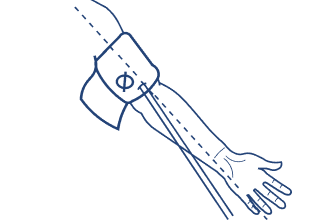
Slide cuff onto your bare upper arm, with tube exiting towards your hand on the inside of your elbow.
Step four
4
Step five
5
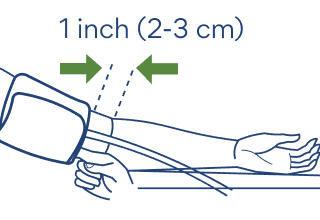
Wrap cuff over your arm and secure in place. Lower edge of cuff should lie 1 inch above your elbow. Don’t over-tighten.
Lay your arm on a table, palm upwards, so cuff is at the same height as your heart. Don’t bend tube.
Step six
6


Step seven
7
Sit silently with your legs uncrossed and flat on the ground. Press START/STOP to turn on the device and start a reading.
Open your Brook app, tap Profile, then scroll to the blood pressure icon to display your data.
Step eight
8
Remove the monitor from packaging. Pull the plastic tab out he battery compartment. Batteries are pre-loaded.
Step one
1
Select the cuff that comfortably wraps around your upper arm, with room for two fingers between the cuff and your arm.
Step two
2
Step three
3
Plug the cuff tube connector into the side of the device.
Slide cuff onto your bare upper arm, with tube exiting towards your hand on the inside of your elbow.
Step four
4
Step five
5
Wrap cuff over your arm and secure in place. Lower edge of cuff should lie 1 inch above your elbow. Don’t over-tighten.
Lay your arm on a table, palm upwards, so cuff is at the same height as your heart. Don’t bend tube.
Step six
6
Step seven
7
Sit silently with your legs uncrossed and flat on the ground. Press START/STOP to turn on the device and start a reading.
Open your Brook app, tap Profile, then scroll to the blood pressure icon to display your data.
Step eight
8
Remove the monitor from packaging. Pull the plastic tab out he battery compartment. Batteries are pre-loaded.
Step one
1
Select the cuff that comfortably wraps around your upper arm, with room for two fingers between the cuff and your arm.
Step two
2
Step three
3
Plug the cuff tube connector into the side of the device.
Slide cuff onto your bare upper arm, with tube exiting towards your hand on the inside of your elbow.
Step four
4
Step five
5
Wrap cuff over your arm and secure in place. Lower edge of cuff should lie 1 inch above your elbow. Don’t over-tighten.
Lay your arm on a table, palm upwards, so cuff is at the same height as your heart. Don’t bend tube.
Step six
6
Step seven
7
Sit silently with your legs uncrossed and flat on the ground. Press START/STOP to turn on the device and start a reading.
Open your Brook app, tap Profile, then scroll to the blood pressure icon to display your data.
Step eight
8
That’s it! Your blood pressure cuff is set up to transmit your readings to your Brook app.
That’s it! Your blood pressure cuff is set up to transmit your readings to your Brook app.
Brook
155 108th Ave NE
Suite 350
Bellevue, WA 98004
Connect with Brook








Brook
155 108th Ave NE
Suite 350
Bellevue, WA 98004
Connect with Brook
Brook
155 108th Ave NE
Suite 350
Bellevue, WA 98004
Connect with Brook
That’s it! Your blood pressure cuff is set up to transmit your readings to your Brook app.